Filling out the Vietnam e-Visa application can feel confusing at first — the form contains many fields, the wording is not always intuitive, and the official website doesn’t explain each step in detail.
This guide provides a complete example of how to fill out the application, including screenshots and explanations for every section. It’s based on the version of the form from the official Vietnam immigration website and personal experience of submitting an e-Visa application.
How to apply for a Vietnam e-Visa?
You can submit your e-Visa application yourself through the official Vietnam portal: https://evisa.gov.vn.
If you’re still deciding which visa type you need or whether you qualify for an e-Visa, we recommend reading our detailed guide Vietnam Visa Requirements for 2026: A Complete Guide for Travelers — it covers all current visa categories and entry rules.
Below is a step-by-step tutorial that will help you complete the online e-Visa form correctly, prepare your photo, and avoid the most common application mistakes.
1. e-Visa main page
On the main page of the official e-Visa portal, click “Apply now” — this button takes you directly to the application form.
You’ll immediately move to page, where you begin entering your personal information.
2. Portrait photography
At this step, you need to upload a portrait photo. You can take it with your phone or go to a studio — both options work as long as the image meets the requirements.
Photo requirements:
- aspect ratio 2×3
- format: jpg / jpeg
- file size: under 2 MB
- straight, front-facing photo
- no glasses, hats, or head coverings
- well-lit face
- white background
📌 Important:
Phone photos are accepted as long as they are good quality and match the official requirements.
If your image is larger than 2 MB
You won’t be able to upload it. You can reduce the size in several ways:
- decrease resolution (e.g., down to 400×600 px)
- use any phone app, which you find by keywords “Photo Compress”
- if you’re on Windows: open in Paint → “Resize” → reduce size (e.g., by 50%)
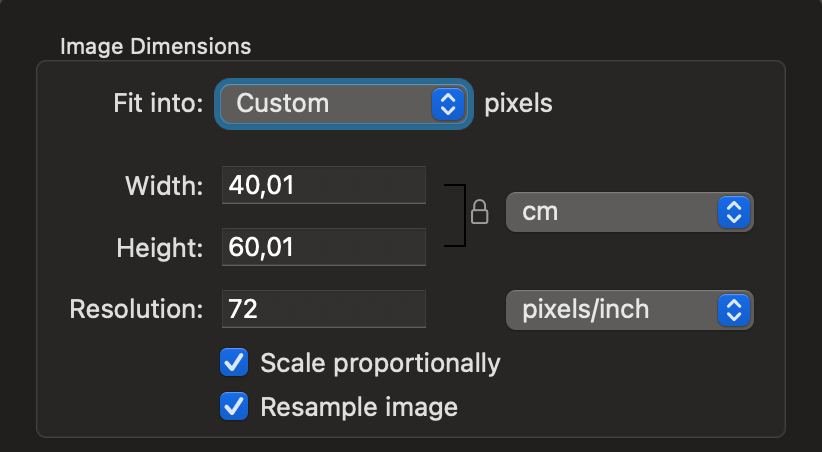
- If you’re using a Mac, open the image in Preview → Tools → “Adjust Size” and change the resolution to 40×60 cm. You can also use 4×6 cm as recommended on the official e-Visa website — just make sure the photo quality remains clear.
Below is an example of photo settings used to reduce the file size to 73 KB.
3. Personal Information
This section includes your basic identification details: full name, date of birth, nationality, and gender.
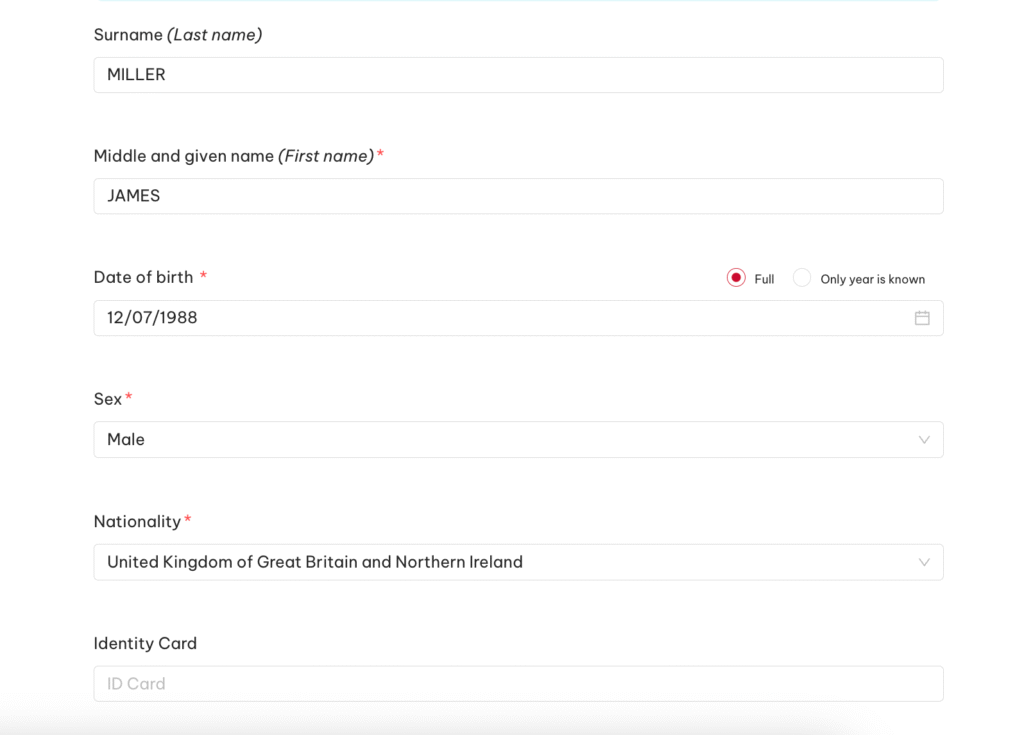
Surname (Last name)
Enter your last name exactly as in your passport.
Example: MILLER
Middle and given name (First name)
Enter your first name, and if applicable, your middle name only if it appears in your passport.
Example: JAMES
If your passport includes a patronymic or middle name, enter it fully:
Example: JAMES ALEXANDER
Date of birth
Use the format DD/MM/YYYY.
Example: 12/07/1988
Sex
Choose Male or Female.
Example: Male
Nationality
Select your citizenship.
Example: United Kingdom of Great Britain and Northern Ireland
Identity Card (optional)
This field is required only for applicants from countries that use national ID cards. If your country does not issue an ID card, you can leave this field empty.

Enter an active email address — this is where you will receive your e-Visa confirmation.
Example: james.miller@example.com
Religion
Enter your religion (any is acceptable), or type “None” / “No religion” if you don’t wish to specify one.
Example: No religion
Place of birth
Enter the location exactly as stated in your passport.
Example: MANCHESTER
Email + Re-enter Email
Enter the same email address again to confirm it.
Example: james.miller@example.com
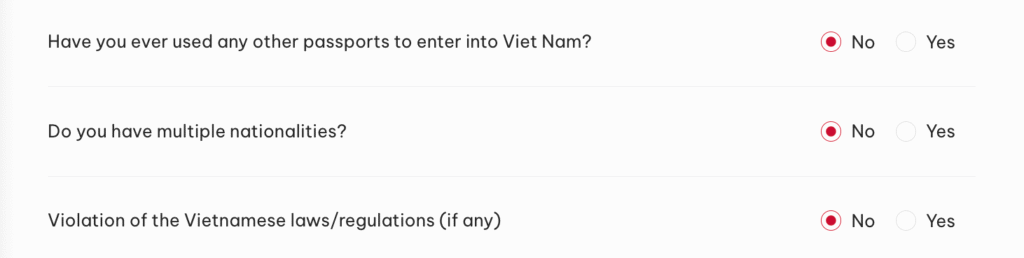
Have you ever used any other passports to enter Viet Nam?
If you have previously entered Vietnam using a different passport (for example, an older passport or a passport from another country), you will need to provide the details of that passport. Enter the following information for each passport you have used:
- Passport number
- Full name as written in that passport
- Date of birth (DD/MM/YYYY)
- Nationality
If you have never entered Vietnam with any other passport → select “No.”
Do you have multiple nationalities?
If you have only one nationality → No.
Violation of Vietnamese laws/regulations (if any)
If you have never violated Vietnamese laws → No.
4. Requested information
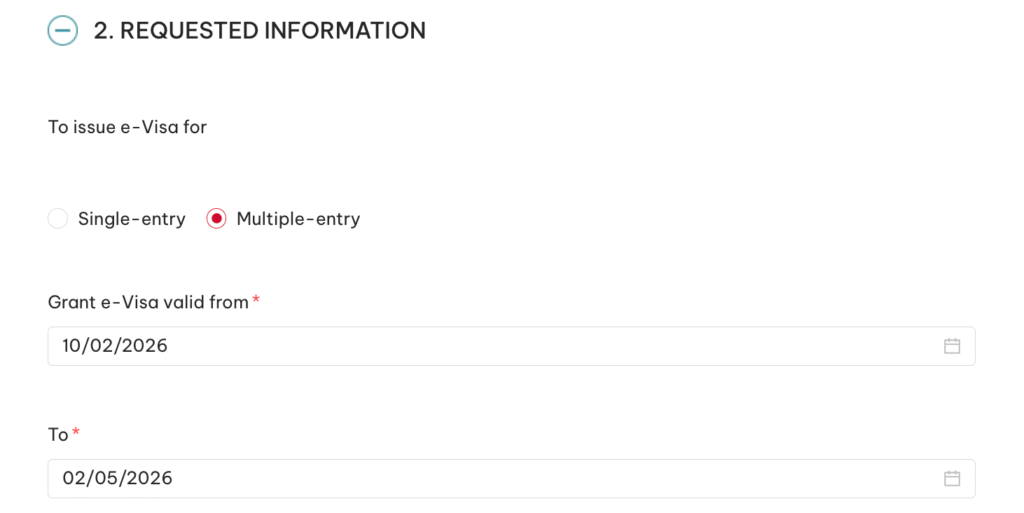
This section defines the validity period of your visa — the start and end dates.
Single-entry / Multiple-entry
Single-entry: one entry into Vietnam
Multiple-entry: recommended if you plan to travel to Cambodia, Laos, Thailand, or elsewhere and return to Vietnam
Example: Multiple-entry
Grant e-Visa valid from
This is the start date of your visa’s validity.
From this day, your 90-day period begins.
Important:
- You cannot enter Vietnam before this date.
- Entering later is allowed.
- You can choose the arrival date shown on your flight ticket.
If your flight arrives shortly after midnight (e.g., 00:20), you may choose the date one day earlier, just in case the plane lands before expected. You cannot enter before the start date written on the visa.
Example: 10/02/2026
To (visa expiration date)
This is the last day your visa remains valid.
Maximum validity: 90 days.
Example: 02/05/2026
5. Passport Information
This section includes your passport number, issuing authority, and validity dates.
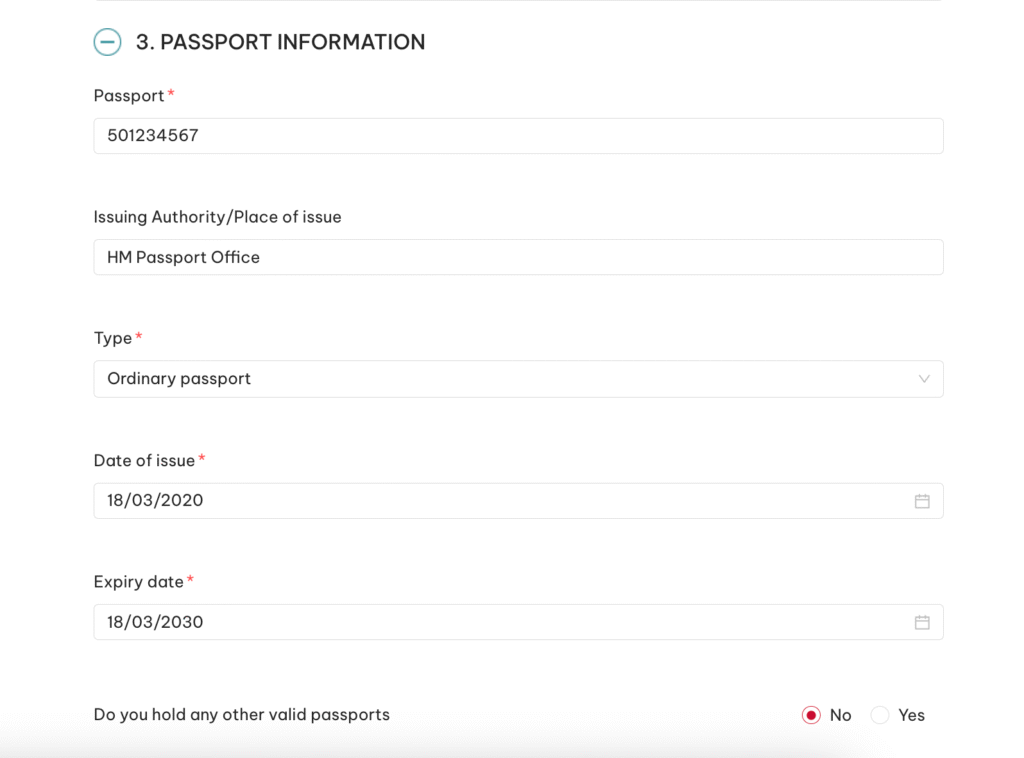
Passport
Enter the number without spaces.
Example: 501234567
Issuing Authority / Place of issue
Enter this exactly as written in your passport.
Example: HM Passport Office
Type
Most applicants choose Ordinary passport.
Example: Ordinary passport
Date of issue
Enter the passport’s date of issue exactly as shown in your document.
Example: 18/03/2020
Expiry date
Enter the passport’s expiry date as printed in your passport. Make sure your passport will remain valid for at least 6 months from the date you enter Vietnam — this is a mandatory requirement.
Example: 18/03/2030
Do you hold any other valid passports
If you have more than one active passport, enter the details of your additional passport here.
If you only have one passport → select No.
6. Contact Information
Here you need to provide your residential address and phone number.
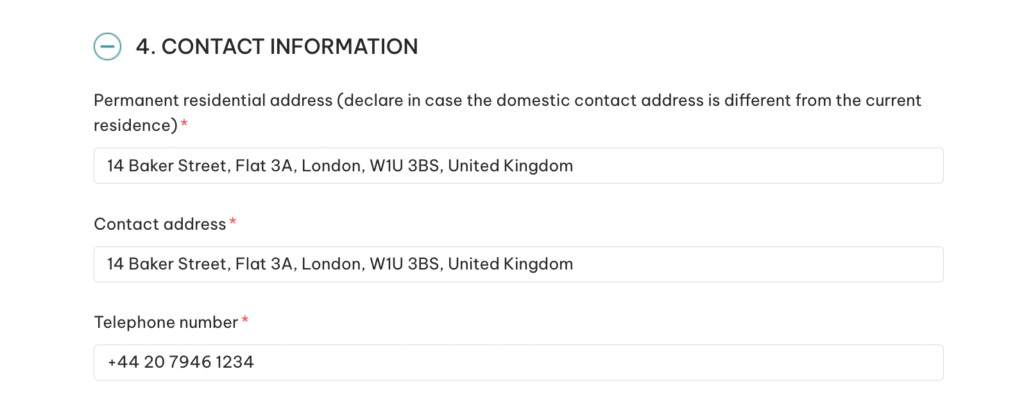
Permanent residential address
Your home address in your country of residence.
Example: 14 Baker Street, Flat 3A, London, W1U 3BS, United Kingdom
Contact address
You may use the same address.
Example: 14 Baker Street, Flat 3A, London, W1U 3BS, United Kingdom
Telephone number
Provide a phone number where you can be reached.
Example: +44 20 7946 1234
Emergency contact
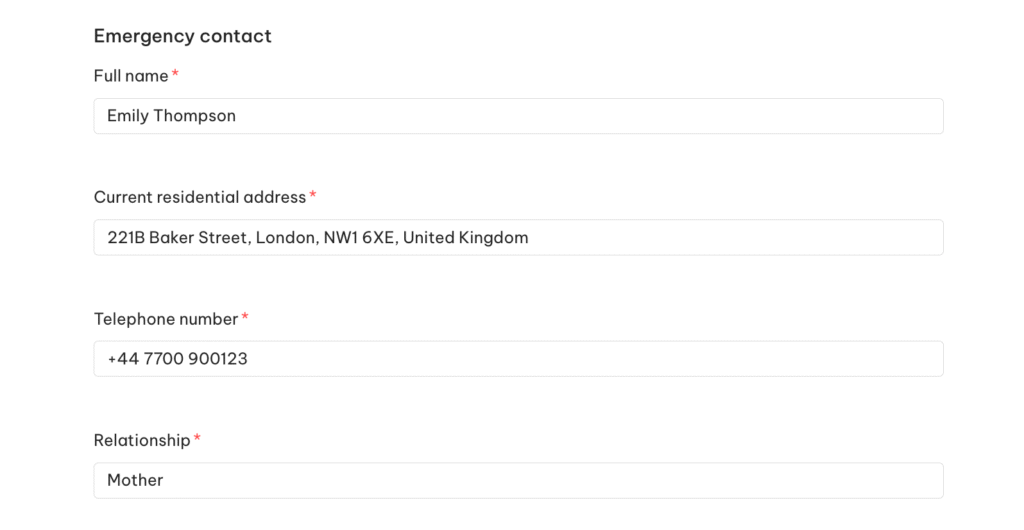
A person who can be contacted in case of emergency — a family member, partner, or friend.
Example:
- Full name: Emily Thompson
- Address: 221B Baker Street, London, NW1 6XE, United Kingdom
- Telephone: +44 7700 900123
- Relationship: Mother
7. Occupation
This step includes your professional details.
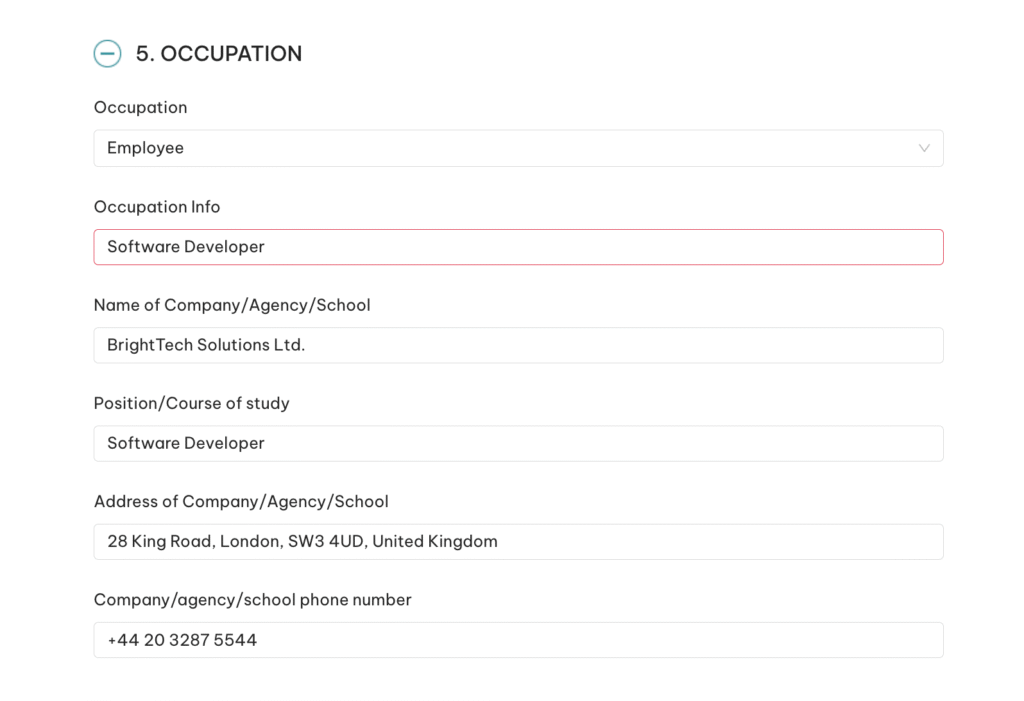
Choose your status:
- Employee
- Businessman
- Student
- Retired
Example: Employee
Occupation info
Your job title or field of work.
Example: Software Developer
Name of Company / Agency / School
Enter the organization where you work or study.
Example: BrightTech Solutions Ltd.
Address of Company
Address of your workplace, school, or registered business.
Example: 28 King Road, London, SW3 4UD, United Kingdom
Phone number
Provide the company’s phone number.
Example: +44 20 3287 5544
8. Information about the trip
This block covers your travel purpose, expected entry date, and accommodation in Vietnam.
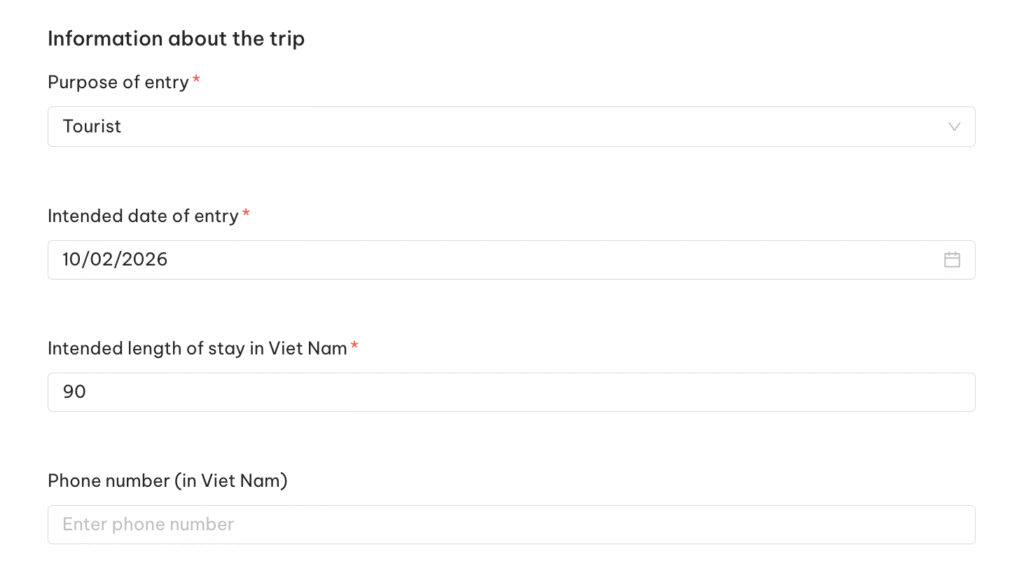
Purpose of entry
Choose what matches your trip:
- Tourist
- Visiting relatives
- Working
- Business
- Other
Example: Tourist
Intended date of entry
The approximate or planned arrival date.
You must enter Vietnam within the validity period chosen earlier.
Example: 10/02/2026
Intended length of stay
Enter how many days you plan to stay.
You may use your return ticket or choose up to 90 days.
Example: 90
Phone number in Vietnam (optional)
You may leave this blank or enter your hotel’s phone number.
Residential address in Vietnam
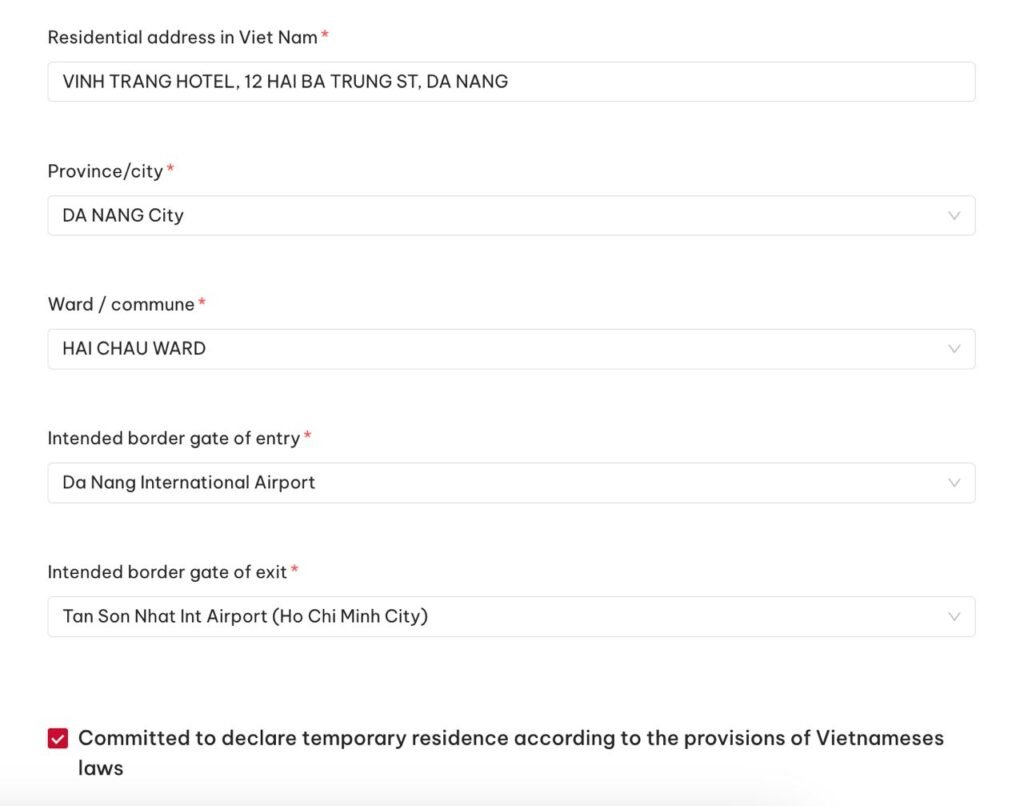
Enter the address of your first booked hotel. You don’t need to list the entire trip.
Example: VINH TRANG HOTEL, 12 HAI BA TRUNG ST, DA NANG
Province / City
Choose the city where your hotel is located.
Example: DA NANG City
Ward / Commune
The district of your hotel.
Example: HAI CHAU WARD
Intended border gate of entry / exit
Select the airport or border crossing.
Example:
- Entry: Da Nang International Airport
- Exit: Tan Son Nhat Int Airport (Ho Chi Minh City)

Agency/Organization/Individual that the applicant plans to contact when enter into Viet Nam?
Choose No unless an official organization is supervising your visit.
Have you been to Viet Nam in the last 01 year?
If you’ve been to Vietnam in the last year then you’ll need to mention dates of the last visit (you can find them in your passport) and Purpose of trip (for example, “Tourist”, if you were visiting Vietnam as a tourist, otherwise you can find the full list of “Purpose of entry” in the form)
If not → No.
Do you have relatives who currently reside in Viet Nam?
If you have relatives in Vietnam you’ll need to mention their Full name, Date of birth, Nationality, Relationship and Residential address in Viet Nam.
If not → No.
9. Children under 14 (optional)
If you are traveling without children, leave this section blank.
If you have children under 14 traveling with you, enter their full name, gender, date of birth, and upload a portrait photo with the same requirements as the main applicant.
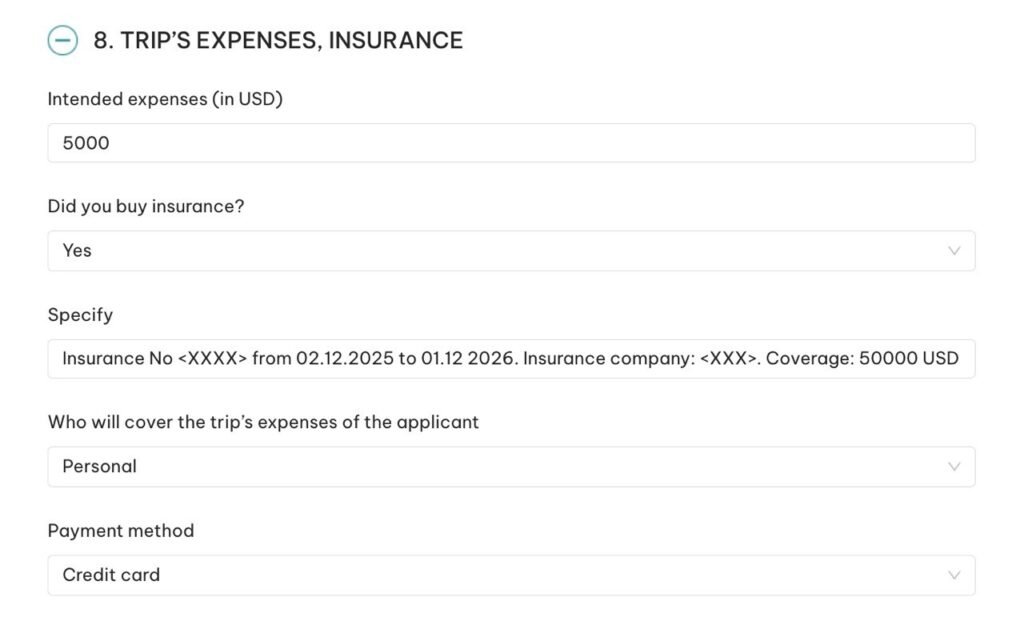
10. Trip’s expenses, Insurance
Intended expenses
Approximate amount you expect to spend.
Example: 5000 USD
Did you buy insurance?
Choose Yes if you already have travel insurance.
In any case, it’s strongly recommended to purchase travel insurance to protect yourself from unexpected medical expenses.
Example: Yes
If selected “Yes” then specify insurance details.
Example: Insurance No <XXXX> from 02.12.2025 to 01.12 2026. Insurance company: <XXX>. Coverage: 50000 USD
Who will cover the trip’s expenses of the applicant
If you are paying for yourself → Personal
Example: Personal
Payment method
Most applicants choose Credit card, but Cash is also acceptable.
Example: Credit card
Final step
After filling in all the fields, click Next, review your information carefully, and proceed to payment (usually 25–50 USD depending on single/multiple entry visa type you’ve selected).
Once the payment is processed, you will receive email confirmation. Your visa is normally issued within a few days.
How to check e-Visa status after you’ve submitted your application
You can also check status of your visa online, using this link https://evisa.gov.vn/e-visa/search.
Disclaimer:
This example is intended for informational purposes and based on real application experience. Requirements may change over time — always check the latest information on the official Vietnamese immigration website before applying.
Wishing you a smooth application process and an unforgettable trip to Vietnam!
You May Also Like
- Vietnam Visa Requirements for 2026: A Complete Guide for Travelers
- Vietnamese Cuisine: 7 Must-Try Dishes in Vietnam
- New Year in Da Nang, Vietnam: Is It Worth Visiting?
Useful Links & Official Sources
- Vietnam Official E-Visa Portal:
https://evisa.gov.vn — apply for Vietnamese e-Visa. - Ministry of Foreign Affairs (MOFA):
https://www.mofa.gov.vn — official guide to destinations, cities, and travel planning.